Introduction
Diwali — The Festival of Lights — ek aisa samay hota hai jab har taraf roshni, khushi aur creativity ka mahaul hota hai! Agar aap AI tools jaise Midjourney, DALL·E, ya Leonardo AI use karte ho, to aap apne ideas ko magical visuals mein badal sakte ho. Diwali festival image prompt
Thank you for reading this post. Don't forget to subscribe!
Is blog mein hum share kar rahe hain best Diwali image prompts jo aapko madad karenge ultra-realistic, beautiful, aur SEO-friendly Diwali images generate karne mein — chahe aap designer ho, blogger ho, ya AI artist!

Best AI Image Prompts for Diwali Festival
Yahan aapko milenge creative aur professional Diwali prompts — perfect for AI image generators like Midjourney, DALL·E, BlueWillow, Stable Diffusion, ya Leonardo AI.
1. Traditional Diwali Portrait Prompt
Diwali festival image prompt Prompt:
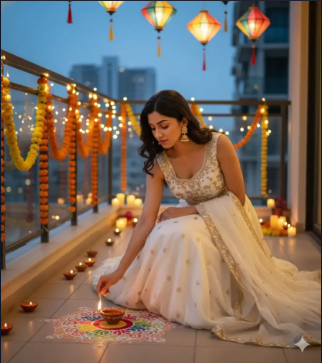
Ultra realistic 4K HD Diwali festival scene, a beautiful young woman wearing a stylish traditional white lehenga with sleeveless blouse and dupatta, gracefully lighting an earthen diya lamp. Her face must remain exactly the same as in the reference photo, no face change. Background is outdoor with a modern festive look — balcony or terrace decorated with fairy lights, lanterns, glowing candles, flower garlands, and elegant rangoli. Professional portrait look.
🪔 Perfect for creating elegant festive portraits or Diwali banner designs.
🔹 2. Tech & Professional AI Image Prompts
AI lovers ke liye yeh section hai — agar aap coding, education, ya tech content ke liye visuals banana chahte ho.
💻 Prompt 1: Professional Coder Look
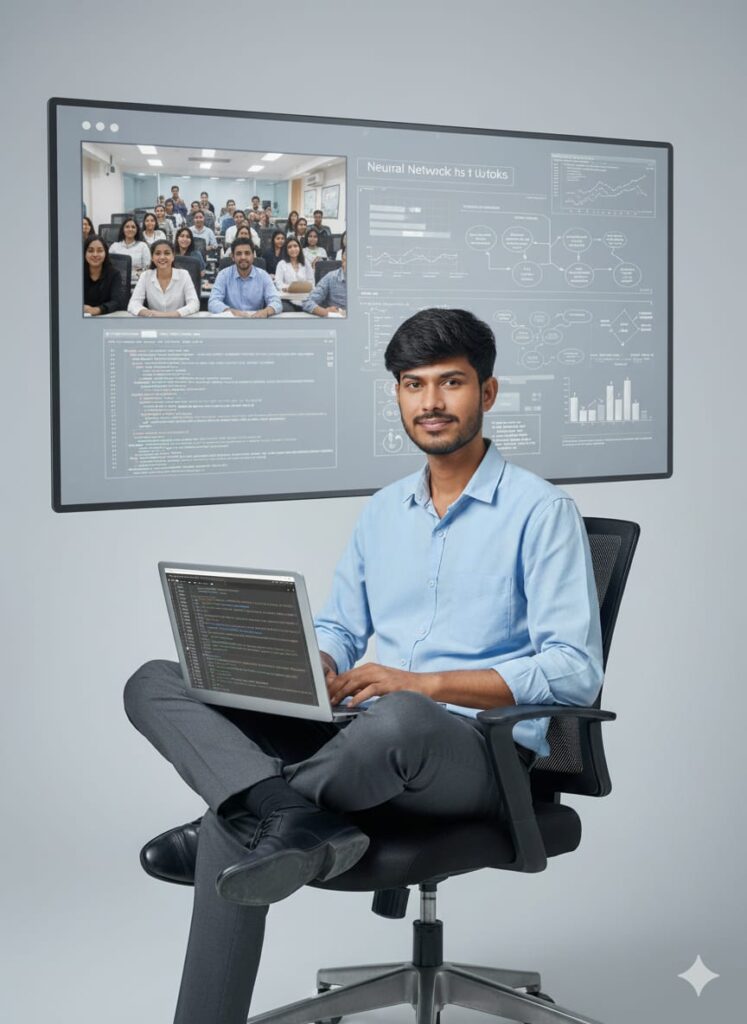
Clean studio portrait of a young man, professional appearance, seated comfortably on a black ergonomic office chair. He is wearing a light blue collared shirt and dark grey trousers.
The man has a slight, professional smile and is looking directly at the camera. A sleek silver laptop is balanced on his lap, with the screen clearly visible displaying neat, syntax-highlighted Python code with comments on a dark theme.
Background: minimalist solid light grey, soft studio lighting, crisp focus. High-resolution, editorial-style portrait.
Short Version:
Studio shot: person on chair with laptop showing Python code, clean background, high-res, professional.
💡 Prompt 2: Teacher & Student Coding Scene
Photorealistic image of a teacher and student sitting across a small table with a laptop open showing readable code (JavaScript/Python). Warm natural light from the left, cozy modern room with bookshelves, notebook, pen, teacher pointing at screen, student taking notes. Cinematic, high detail, 35mm lens feel.
Short Version:
Photorealistic: teacher explaining code to student, cozy room, laptop visible, cinematic look.
🧑💼 Prompt 3: LinkedIn / Portfolio Image
Clean studio portrait: <YOUR APPEARANCE> seated on an ergonomic chair with laptop on lap, showing neat Python code. Minimalist background, soft light, professional outfit, slight smile, crisp focus.
Short Version:
LinkedIn-style portrait: person with laptop, code visible, professional lighting.
🎬 Prompt 4: YouTube / Blog Thumbnail
Bold, colorful YouTube thumbnail: <YOUR APPEARANCE> sitting on a chair holding laptop turned toward camera showing big, readable code snippets. Exaggerated teaching expression, area on right for text overlay: “Code Sikho With Me”. 16:9 ratio, vibrant, modern.
Short Version:
YouTube thumbnail: teacher with laptop showing code, bold text area, 16:9, colorful.
🧩 Prompt 5: Illustration / Flat Design
Flat vector illustration of a teacher and student with laptop on table. Screen shows simple code blocks, bright friendly color palette, minimal icons, isometric design — perfect for blog or app explainer graphics.
Short Version:
Isometric vector: teacher with laptop showing code blocks, friendly palette.
🎥 Prompt 6: Close-up Detail Shot
Close-up of hands typing on a laptop; screen showing readable code editor, blurred cozy background with notebook, soft window light, shallow depth of field.
Short Version:
Close-up: hands typing on laptop with visible code editor, cinematic shallow focus.
🚫 Negative Prompts (Avoid These)
Use these to remove unwanted AI artifacts:
low resolution, text unreadable, watermark, extra people, cluttered background, distorted hands, unrealistic proportions, over-saturated, anime style.
🏮 Bonus Tips for AI Diwali Images
- Use “warm lighting,” “bokeh effect,” “vibrant Indian decor” keywords for authentic festive vibes.
- Prefer portrait mode for people shots, and wide-angle for festival scenes.
- Experiment with glow, fireworks, and rangoli patterns for unique Diwali touches.
🎉 Conclusion
Diwali creativity ka perfect time hai to apni AI skills ko explore karne ka!
Chaahe aap social media ke liye visuals bana rahe ho, ya blog thumbnails, in AI Diwali prompts se aapke images standout karenge.
💬 Apne favorite prompt ko comments mein share karo — aur batayein kaunsa AI tool aapko best results deta hai!
About the Author